Author: ar2008853@gmail.com

  • How to Become a Virtual Assistant in 2026 (Complete Beginner Guide)

    How to Become a Virtual Assistant in 2026 (Complete Beginner Guide)

    The digital economy is growing faster than ever, and businesses worldwide are outsourcing daily tasks to remote professionals. One of the most beginner-friendly and high-demand digital careers today is becoming a Virtual Assistant (VA). In 2026, virtual assistants are earning stable online income while working from home with flexible schedules.

    If you want to start earning online without advanced technical skills, this guide will help you understand everything about becoming a virtual assistant from scratch.


    What is a Virtual Assistant?

    A Virtual Assistant is a remote professional who provides administrative, technical, or creative support to businesses, entrepreneurs, or content creators online. Instead of hiring full-time office staff, companies now prefer hiring VAs to save costs and increase productivity.

    You can work with clients from the USA, UK, Canada, or anywhere in the world while sitting at home.


    Why Virtual Assistant is a Great Digital Skill in 2026

    The demand for remote workers has increased massively due to online businesses, e-commerce stores, and digital marketing agencies.

    Key Benefits:

    • No degree required
    • Low startup cost
    • Work from home
    • Flexible working hours
    • High international demand
    • Beginner-friendly career

    Many beginners start earning within 1–3 months after learning basic skills.


    Types of Virtual Assistant Jobs

    You can specialize based on your interest and skills.

    1. Administrative Virtual Assistant

    • Email management
    • Data entry
    • Scheduling meetings
    • File organization

    2. Social Media Virtual Assistant

    • Posting content
    • Replying to comments
    • Managing Instagram or Facebook pages
    • Content scheduling

    3. E-commerce Virtual Assistant

    • Product uploading
    • Order management
    • Customer support
    • Shopify or Amazon store handling

    4. Content & Blog Assistant

    • WordPress posting
    • Basic SEO optimization
    • Image uploading
    • Article formatting

    5. Customer Support Assistant

    • Live chat handling
    • Email support
    • Customer queries management

    Skills You Need to Start

    You don’t need advanced coding knowledge. Basic digital skills are enough.

    Essential Skills:

    • Communication skills (English writing)
    • Basic computer knowledge
    • Internet research
    • Time management
    • Attention to detail

    Helpful Tools to Learn:

    • Google Docs & Sheets
    • Canva
    • Trello or Asana
    • Zoom
    • WordPress basics

    How to Learn Virtual Assistant Skills (Step-by-Step)

    Step 1: Choose One Service

    Start with one area like data entry or social media management.

    Step 2: Learn Free Online

    Use YouTube tutorials and free courses to understand tools.

    Step 3: Practice Daily

    Create sample work like:

    • Social media posts
    • Email templates
    • Blog formatting

    Step 4: Build a Simple Portfolio

    Show examples of your work using Google Drive or a simple website.


    Where to Find Virtual Assistant Jobs

    Here are beginner-friendly platforms:

    • Upwork
    • Fiverr
    • Freelancer
    • PeoplePerHour
    • LinkedIn

    You can also contact small business owners directly through email or social media.


    How Much Do Virtual Assistants Earn?

    Earnings depend on skills and experience.

    • Beginners: $5–$10 per hour
    • Intermediate: $10–$25 per hour
    • Expert VAs: $30+ per hour

    Many full-time VAs earn $800–$3000 monthly working remotely.


    Common Mistakes Beginners Make

    • Trying to learn too many skills at once
    • Not creating a portfolio
    • Poor communication with clients
    • Charging too low for long periods
    • Not specializing in one service

    Focus on improving one skill first and grow gradually.


    Future of Virtual Assistants

    In 2026 and beyond, more businesses are moving online. Entrepreneurs prefer remote teams, which means VA demand will continue increasing.

    AI tools are helping VAs work faster, not replacing them. Skilled assistants who know tools and communication will always stay in demand.


    Final Thoughts

    Becoming a Virtual Assistant is one of the easiest ways to enter the digital world. You don’t need heavy investment or advanced education — just consistency, learning, and practice.

    If you stay dedicated and improve your skills regularly, virtual assistance can become a long-term online career with stable income.
  • Email Marketing for Beginners: Build Your First Campaign

    Email Marketing for Beginners: Build Your First Campaign

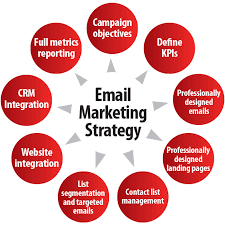
    Email marketing remains one of the most effective digital marketing strategies in 2026. Unlike social media, email allows you to reach your audience directly, build relationships, and drive sales. Beginners can start with simple campaigns and gradually grow into advanced strategies.

    This guide will show you how to understand email marketing, create your first campaign, and start generating results.


    What Is Email Marketing?

    Email marketing is the process of sending promotional, informational, or transactional emails to a list of subscribers. The goal is to:

    • Build trust and relationships with your audience
    • Promote products, services, or content
    • Drive traffic to your website or offers
    • Increase conversions and sales

    Why Beginners Should Learn Email Marketing

    • High ROI: Email marketing consistently delivers higher returns than many other marketing channels.
    • Direct Access: Reach your audience without relying on social media algorithms.
    • Scalable: Grow your list and automate campaigns for more efficiency.
    • Global Opportunities: Businesses worldwide hire email marketers and freelancers.

    Even beginners with minimal experience can start building campaigns and earn money.


    Step 1: Choose an Email Marketing Platform

    Several beginner-friendly platforms offer free plans:

    • Mailchimp: Easy for beginners, automation features, free plan available.
    • MailerLite: Simple drag-and-drop editor, ideal for small lists.
    • Sendinblue: Email marketing and SMS marketing in one platform.
    • ConvertKit (Free Plan): Great for bloggers and content creators.

    Choose one platform and explore its free features to start learning.


    Step 2: Build Your Email List

    Your email list is the foundation of your campaigns.

    Ways to grow your list:

    • Add sign-up forms on your website or blog
    • Offer lead magnets: eBooks, checklists, templates
    • Promote subscription links on social media
    • Collect emails during events or webinars

    Focus on quality over quantity—engaged subscribers are more valuable than large inactive lists.


    Step 3: Create Engaging Emails

    A good email has:

    1. Subject Line: Short, clear, and engaging to encourage opening.
    2. Body Content: Valuable, easy-to-read content with a clear purpose.
    3. Call-to-Action (CTA): Direct your reader to take action (visit website, buy, download, subscribe).
    4. Design: Use headings, bullets, and images to make the email readable.

    Beginner tip: Start with plain text emails, then gradually add visuals.


    Step 4: Plan Your First Campaign

    1. Decide the goal: Promote a product, share content, or build a relationship.
    2. Segment your list: Group subscribers based on interests if possible.
    3. Schedule your email: Decide the day and time for sending.
    4. Test: Send a test email to yourself to check formatting and links.

    Automation can help send welcome emails and drip campaigns to new subscribers.


    Step 5: Analyze and Improve

    Tracking results is crucial. Most email marketing platforms provide analytics:

    • Open rate: Percentage of subscribers who open your email
    • Click-through rate (CTR): Percentage who click links in your email
    • Bounce rate: Emails that could not be delivered
    • Unsubscribe rate: Subscribers who leave

    Analyze data to see what works and adjust your campaigns accordingly.


    Step 6: Start Freelancing or Monetizing

    Once comfortable, you can:

    • Offer email campaign setup services on Fiverr or Upwork
    • Manage email newsletters for small businesses
    • Combine email marketing with content writing or social media management

    Even beginners can start with small clients and gradually build a portfolio.


    Tips for Beginners

    1. Keep emails simple and valuable.
    2. Focus on building trust with subscribers.
    3. Write personal, conversational emails to increase engagement.
    4. Use free templates initially, then customize as skills improve.
    5. Test different subject lines and content formats to see what works.

    Conclusion

    Email marketing is a beginner-friendly digital skill with high potential for freelancing, online business growth, and passive income. By learning how to create campaigns, build lists, and analyze results, beginners can start running successful email campaigns and earning online in 2026.

    Focus on small steps: select a platform, grow your email list, create your first email, and track performance. With practice, email marketing can become a powerful tool for both personal and professional growth.


  • Social Media Management: Skills, Tools, and Career Guide

    Social Media Management: Skills, Tools, and Career Guide

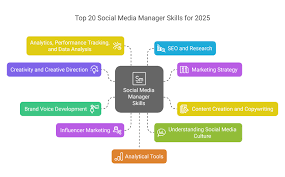
    Social media has become an essential part of business and personal branding in 2026. Companies, influencers, and entrepreneurs rely on social media managers to grow audiences, engage followers, and drive sales. Learning social media management is a highly valuable digital skill that beginners can start today.

    This guide will cover the skills required, tools to use, and how to start a career in social media management.


    What Is Social Media Management?

    Social media management involves planning, creating, scheduling, and analyzing content on platforms like:

    • Instagram
    • Facebook
    • Twitter/X
    • LinkedIn
    • TikTok
    • YouTube

    The goal is to increase brand awareness, engagement, and conversions through consistent, high-quality social media presence.


    Why Social Media Management Is in High Demand

    • Businesses need to connect with audiences online.
    • Social media marketing budgets are increasing globally.
    • Freelancers and agencies are hired to manage accounts professionally.
    • Platforms are evolving rapidly, requiring skilled managers to adapt strategies.

    Even beginners with the right skills can get freelance clients and work remotely.


    Step 1: Learn Essential Skills

    1. Content Creation

    • Design visually appealing graphics or videos.
    • Write engaging captions and posts.
    • Understand your target audience and tone of voice.

    2. Scheduling & Planning

    • Plan content calendars for consistent posting.
    • Use scheduling tools to automate posting.

    3. Analytics & Strategy

    • Track engagement metrics: likes, comments, shares, and reach.
    • Adjust strategies based on performance.
    • Learn which content resonates with your audience.

    4. Communication Skills

    • Respond to comments and messages professionally.
    • Build relationships with followers.

    Step 2: Use Social Media Management Tools

    Beginner-friendly tools make managing multiple accounts easier:

    • Canva: Create graphics and posts.
    • Buffer / Hootsuite: Schedule posts across multiple platforms.
    • Later: Plan Instagram and TikTok content visually.
    • Google Analytics & Meta Business Suite: Track performance and insights.
    • CapCut / InShot: Edit short videos for social media.

    Learning these tools increases efficiency and credibility as a social media manager.


    Step 3: Practice by Managing Accounts

    Before taking clients, practice on:

    • Personal social media accounts
    • Small business or community pages
    • Volunteer accounts for nonprofits or clubs

    Focus on creating content, posting consistently, and analyzing engagement. This builds experience for your portfolio.


    Step 4: Build a Portfolio

    A portfolio demonstrates your skills to potential clients:

    • Include screenshots of posts and analytics showing growth
    • Show examples of content calendars and strategies
    • Highlight any engagement improvements or campaigns

    Even beginner results can impress clients if presented professionally.


    Step 5: Start Freelancing

    Once confident, offer your services online:

    • Fiverr: Start with small gigs like creating posts or scheduling content.
    • Upwork: Find long-term clients for account management.
    • Social media groups: Facebook or LinkedIn communities often post freelance jobs.

    Deliver quality work, meet deadlines, and collect reviews to attract more clients.


    Step 6: Scale Your Social Media Career

    After gaining experience:

    • Specialize in a niche: e.g., fitness, travel, tech
    • Offer full-service management: content creation, posting, engagement, and analytics
    • Manage multiple clients for higher income
    • Explore social media marketing certifications to boost credibility

    Tips for Beginners

    1. Start small: Focus on one or two platforms first.
    2. Follow trends: Stay updated with new features, hashtags, and video formats.
    3. Be consistent: Posting and engagement matter more than perfect content.
    4. Learn from competitors: Analyze similar accounts to improve your strategy.
    5. Practice storytelling: Content that tells a story engages followers better.

    Conclusion

    Social media management is a beginner-friendly digital skill with high demand and global opportunities. By learning content creation, scheduling, analytics, and communication, you can manage accounts professionally and start earning online.

    Start by practicing on small accounts, build a portfolio, and offer services on freelancing platforms. Over time, social media management can turn into a full-time career, side income, or a stepping stone to digital marketing expertise.

  • Best AI Tools Every Student Should Learn in 2026

    Artificial Intelligence (AI) is no longer just a futuristic concept—it’s actively shaping how we study, work, and create in 2026. For students, learning how to use AI tools can dramatically improve productivity, research, and even earning potential.

    This guide will cover the best AI tools every student should know, their uses, and tips to get started quickly.


    Why Students Should Learn AI Tools

    • Boost Productivity: Automate repetitive tasks like note-taking and summarizing content.
    • Enhance Learning: Access instant explanations, translations, and research help.
    • Skill Development: AI skills are highly valued in the job market.
    • Creative Projects: AI assists in designing presentations, graphics, and videos.
    • Future-Ready: Understanding AI prepares students for careers in tech, marketing, and business.

    1. ChatGPT – AI Writing & Assistance

    What it does:

    • Helps with essay writing, research summaries, and brainstorming ideas.
    • Assists in learning new concepts quickly.
    • Can create study notes, flashcards, or even code snippets.

    Tips for students:

    • Use it to simplify complex topics.
    • Always review AI-generated content to ensure accuracy.
    • Combine it with your own notes for better understanding.

    2. Canva AI – Design & Visual Content

    What it does:

    • AI-powered design suggestions for presentations, social media graphics, and posters.
    • Auto-generates templates and layouts.
    • Supports image editing and quick design creation.

    Tips for students:

    • Use Canva AI for project slides, assignments, and event posters.
    • Experiment with templates before creating your own designs.

    3. Notion AI – Productivity & Organization

    What it does:

    • Assists in creating structured notes, to-do lists, and study planners.
    • Summarizes long articles and textbooks.
    • Generates task reminders and study schedules.

    Tips for students:

    • Keep all your class notes and projects organized.
    • Use AI suggestions to save time on summaries.

    4. Grammarly – AI Writing Assistant

    What it does:

    • Corrects grammar, spelling, and punctuation.
    • Improves tone and clarity of your writing.
    • Suggests vocabulary improvements and sentence restructuring.

    Tips for students:

    • Always check essays, emails, and assignments before submission.
    • Use advanced suggestions to improve academic writing.

    5. ChatPDF / Scholar AI – Research & Study

    What it does:

    • Allows students to upload PDFs and get AI summaries.
    • Provides answers and explanations from textbooks or research papers.

    Tips for students:

    • Ideal for reviewing lecture notes quickly.
    • Use as a study companion for exams or assignments.

    6. AI Video & Presentation Tools

    Popular tools include:

    • Pictory AI: Automatically creates short videos from scripts.
    • Synthesia: Generates AI avatars and voiceovers for presentations.

    Tips for students:

    • Make project presentations more engaging.
    • Use AI to save time while creating video assignments.

    7. AI Study Assistants & Flashcards

    Tools like Quizlet AI can help:

    • Generate practice questions
    • Summarize topics into flashcards
    • Track learning progress

    Tips for students:

    • Use AI flashcards for faster memorization.
    • Regular practice improves retention and exam scores.

    How Students Can Learn AI Tools Effectively

    1. Start Small: Focus on 1–2 tools initially.
    2. Hands-On Practice: Apply AI to real assignments and projects.
    3. Explore Tutorials: Free YouTube videos or blogs show step-by-step usage.
    4. Combine Tools: Use multiple AI tools together for better productivity.
    5. Stay Updated: AI is constantly evolving; follow updates and trends.

    Conclusion

    Learning AI tools is essential for students in 2026. They not only improve productivity but also give a competitive edge in academics and future careers. By mastering tools like ChatGPT, Canva AI, Notion AI, Grammarly, and AI research assistants, students can save time, enhance creativity, and gain skills that are highly valuable in the digital world.

    Start exploring AI tools today and integrate them into your study routine. With consistent use, AI can transform the way you learn, create, and prepare for your future career.


  • Content Writing Guide: Become a Paid Writer in 30 Days

    Content Writing Guide: Become a Paid Writer in 30 Days

    Content writing is one of the easiest digital skills to start in 2026, and it can quickly turn into a paid career. Businesses, bloggers, and online platforms constantly need writers for websites, blogs, social media, and marketing. Even beginners can start earning in just 30 days if they follow a structured approach.

    This guide will take you step-by-step from a complete beginner to a paid content writer.


    What Is Content Writing?

    Content writing is the process of creating written material for online or offline platforms. The goal is to inform, engage, or persuade readers.

    Common types of content writing include:

    • Blog articles
    • Website content
    • Product descriptions
    • Email marketing
    • Social media posts
    • Copywriting for ads

    Paid content writers create value for clients by delivering high-quality content that attracts traffic, converts readers, or informs audiences.


    Why Content Writing Is a Great Skill

    • High Demand: Every website or business needs content.
    • Flexible Work: Work from home or anywhere with an internet connection.
    • Low Investment: Start with free tools and basic skills.
    • Portfolio Growth: Your writing portfolio grows with each project.
    • Income Potential: Beginners can earn $10–$50 per article; experienced writers earn $100–$500+ per article.

    Step 1: Learn the Basics of Writing

    Even beginners can start writing with these essentials:

    1. Grammar and Spelling: Use free tools like Grammarly or Hemingway App.
    2. Sentence Structure: Keep sentences short and clear.
    3. Paragraphs: Break content into small, readable paragraphs.
    4. Tone and Voice: Write according to the audience and purpose.
    5. Research: Verify facts and provide accurate information.

    Step 2: Understand SEO Basics

    SEO (Search Engine Optimization) is essential for online content. Basic SEO skills make your writing more valuable.

    • Use relevant keywords naturally in your content.
    • Write headings (H1, H2, H3) to structure the article.
    • Optimize meta descriptions and titles.
    • Add internal links to other articles when possible.

    Even basic SEO knowledge can help you get better-paying clients.


    Step 3: Practice Writing Daily

    Practice is key to improvement. Start small:

    • Write 1 blog post of 500–700 words daily.
    • Pick topics you enjoy or research trending topics online.
    • Edit your work for clarity, grammar, and readability.

    After a few weeks, you’ll see significant improvement in speed and quality.


    Step 4: Build a Portfolio

    Even if you haven’t been paid yet, a portfolio is essential to attract clients.

    • Include 5–10 sample articles on your niche.
    • Use platforms like Medium, Blogger, or Google Docs.
    • Organize your portfolio by topic or content type.
    • Make it easy for clients to view and download your work.

    A professional-looking portfolio builds trust and credibility.


    Step 5: Start Freelancing

    Once confident in your writing, you can start offering services online:

    • Fiverr: Perfect for beginners offering small projects.
    • Upwork: For long-term clients and higher-paying projects.
    • Social Media & Groups: Many businesses post freelance writing jobs in Facebook or LinkedIn groups.

    Start with small orders, deliver on time, and ask clients for reviews.


    Step 6: Learn to Price Your Work

    Beginners often underprice their work. Here’s a simple guideline:

    • First 30 days: Focus on getting experience and reviews, not high pay.
    • After 30 days: Increase rates gradually as your skill and portfolio grow.
    • Experienced writers can charge $50–$200 per 1000-word article depending on quality and niche.

    Step 7: Improve and Expand

    Once you are comfortable, you can:

    • Explore niches like technology, health, or finance
    • Learn copywriting for higher-paying projects
    • Offer blog management or content strategy services
    • Start your own blog to generate passive income

    Continuous learning and diversification increase your earnings.


    Tips for Beginners

    1. Set a daily writing schedule – consistency beats occasional effort.
    2. Read widely – improve vocabulary and understanding of different writing styles.
    3. Edit thoroughly – clients value polished content.
    4. Use online tools – Grammarly, Hemingway, Canva for visuals.
    5. Be patient – building skills and clients takes time.

    Conclusion

    Content writing is one of the fastest ways to start earning online in 2026. With dedication, practice, and consistent freelancing, beginners can become paid writers in just 30 days.

    Focus on learning the basics, creating high-quality work, and building a portfolio. Once you deliver consistent results, clients will keep coming, and your income will grow steadily.


  • SEO Basics for Beginners: Rank Your First Website

    SEO Basics for Beginners: Rank Your First Website

    If you want your website or blog to get traffic in 2026, understanding SEO (Search Engine Optimization) is essential. SEO helps search engines like Google understand your website and show it to people searching for relevant topics. For beginners, learning SEO can feel overwhelming, but with the right guidance, you can rank your first website and start getting free, organic traffic.

    This guide will cover the basics of SEO and a step-by-step plan to help beginners get started.


    What Is SEO?

    SEO stands for Search Engine Optimization. It is the process of improving your website so that search engines show it higher in search results.

    Main goals of SEO:

    • Increase organic (non-paid) traffic
    • Make your website more visible on Google
    • Improve user experience
    • Build long-term authority online

    SEO has three main components:

    1. On-Page SEO: Optimizing content, headings, images, URLs, and internal links on your website.
    2. Off-Page SEO: Building backlinks from other websites and improving your site’s reputation.
    3. Technical SEO: Improving site speed, mobile-friendliness, indexing, and site structure.

    Why Beginners Should Learn SEO

    • Free Traffic: Once your website ranks, you get visitors without paying for ads.
    • High Demand Skill: Businesses and bloggers need SEO experts.
    • Work From Anywhere: SEO can be done remotely.
    • Long-Term Results: Proper SEO builds sustainable traffic over time.

    Step 1: Choose Your Website Topic

    Before optimizing, decide the niche of your website. Examples:

    • Digital skills
    • Health and fitness
    • Travel and adventure
    • Personal finance
    • Technology and AI

    Choose a topic you are passionate about and that has demand.


    Step 2: Keyword Research

    Keywords are the words people type in Google. Researching the right keywords is the foundation of SEO.

    Tools for beginners:

    • Google Keyword Planner
    • Ubersuggest (free version)
    • AnswerThePublic
    • SEMrush Free Tools

    Tips:

    • Choose low-competition keywords initially
    • Focus on long-tail keywords (phrases with 3–5 words)
    • Make a list of 10–20 keywords to start

    Step 3: On-Page SEO Basics

    On-page SEO ensures your website content is search-engine friendly.

    1. Title Tags: Include your main keyword in the title.
    2. Headings (H1, H2, H3): Organize content with headings containing keywords.
    3. Meta Description: Write a short description including your keyword.
    4. Images: Use descriptive filenames and alt text for every image.
    5. Internal Links: Link related articles within your website.

    Example:

    • Title: “SEO Basics for Beginners: Rank Your First Website”
    • H1: SEO Basics for Beginners
    • H2: What Is SEO?
    • H2: Keyword Research for Beginners

    Step 4: Create High-Quality Content

    Content is the backbone of SEO.

    • Write at least 1000–1200 words per article for beginners
    • Solve readers’ problems
    • Make it readable with short paragraphs and bullet points
    • Use images, infographics, or videos for better engagement

    High-quality content increases your chances of ranking on Google.


    Step 5: Learn Off-Page SEO

    Off-page SEO involves improving your website’s reputation.

    • Build backlinks from relevant websites
    • Guest post on blogs in your niche
    • Share your content on social media
    • Engage in forums and communities

    Avoid black-hat techniques like buying links—they can harm your site.


    Step 6: Technical SEO

    Even beginner websites need basic technical optimization:

    • Ensure your website is mobile-friendly
    • Improve page speed using free tools like Google PageSpeed Insights
    • Submit your sitemap to Google Search Console
    • Use HTTPS for website security

    Technical SEO ensures Google can crawl and index your website properly.


    Step 7: Monitor and Improve

    SEO is ongoing. Track your website performance:

    • Google Analytics: Check traffic, behavior, and top-performing pages
    • Google Search Console: Track keyword performance and indexing
    • Update content regularly
    • Add internal links to new posts

    Consistency and patience are key. SEO results usually appear in 3–6 months for beginners.


    Tips for Beginners

    1. Focus on quality over quantity.
    2. Learn from competitors but create unique content.
    3. Use free SEO tools to reduce costs.
    4. Be patient; SEO takes time to show results.
    5. Keep learning as Google algorithms change regularly.

    Conclusion

    SEO is one of the most valuable digital skills for beginners in 2026. By following on-page, off-page, and technical basics, you can rank your first website and start building organic traffic.

    Remember: start small, focus on one website, write high-quality content, and optimize step by step. Over time, SEO can turn your website into a long-term traffic and income source.


  • How to Learn Video Editing at Home and Earn Online

    Video content is dominating the internet in 2026. From YouTube to Instagram Reels and TikTok, businesses and creators need video editors to make engaging content. The best part? You can learn video editing at home and start earning online, even as a beginner.

    This guide will walk you through the tools, techniques, and strategies to become a successful video editor from scratch.


    Why Video Editing Is a High-Demand Skill

    • Social Media Growth: Businesses rely on short-form videos to attract audiences.
    • YouTube Channels: Every content creator needs video editors.
    • Marketing Campaigns: Ads, promos, and tutorials require professional editing.
    • Freelancing Opportunities: Global clients hire skilled editors remotely.

    With the rise of video platforms and online businesses, video editing is one of the fastest-growing digital skills.


    Step 1: Understand the Basics of Video Editing

    Before opening software, familiarize yourself with key concepts:

    1. Timeline Editing: Arranging clips, images, and audio in order.
    2. Transitions: Smoothly move from one scene to another.
    3. Color Correction: Adjust brightness, contrast, and color tones for better visuals.
    4. Audio Editing: Remove background noise, adjust volume, and add music.
    5. Text and Graphics: Add captions, titles, and overlays to enhance storytelling.

    Understanding these basics will make learning software much easier.


    Step 2: Choose Beginner-Friendly Video Editing Tools

    You don’t need expensive software to start. Beginner-friendly options:

    • CapCut: Free and popular for short videos, great for social media content.
    • DaVinci Resolve (Free Version): Professional-grade software with advanced features.
    • HitFilm Express: Free video editor with basic effects and editing tools.
    • iMovie (Mac Users): Simple and intuitive editing for beginners.

    Start with one tool, master the basics, and then explore advanced software later.


    Step 3: Learn by Doing

    Practical experience is the fastest way to improve.

    Ideas for practice projects:

    • Edit short YouTube clips or TikTok videos
    • Create tutorial or explainer videos
    • Make slideshow videos with music
    • Recreate videos from tutorials to practice effects

    Even practice projects can go into your portfolio when applying for freelance work.


    Step 4: Use Free Learning Resources

    • YouTube Tutorials: Search for beginner video editing tutorials.
    • Free Online Courses: Websites like Udemy and FreeCodeCamp provide free courses.
    • Communities: Join editing communities on Discord, Reddit, or Facebook for tips and feedback.

    Follow step-by-step guides and replicate projects to build skills quickly.


    Step 5: Build a Portfolio

    A strong portfolio demonstrates your skills to clients.

    Tips:

    • Include 5–10 sample videos showcasing different styles
    • Organize by type: short clips, promotional videos, tutorials
    • Upload your portfolio on platforms like YouTube, Vimeo, or Google Drive
    • Add descriptions for each project to explain your work

    A professional-looking portfolio increases your chances of landing clients, even as a beginner.


    Step 6: Start Freelancing

    Once confident with your skills, you can offer services online:

    • Fiverr: Great for beginners starting small projects.
    • Upwork: Ideal for international clients and long-term contracts.
    • Social Media Groups: Facebook and Discord groups often have small business owners looking for editors.

    Start with small projects, deliver quality work, and build your reviews gradually.


    Step 7: Learn Advanced Techniques

    Once you’re comfortable with basics, explore:

    • Motion graphics
    • Green screen editing
    • Special effects and transitions
    • Advanced color grading
    • AI tools for faster editing

    Learning advanced skills increases your rates and attracts higher-paying clients.


    Tips for Beginners

    1. Practice consistently: Daily editing improves speed and creativity.
    2. Follow trends: Keep up with social media trends to create modern content.
    3. Seek feedback: Share work in communities to get constructive criticism.
    4. Focus on storytelling: A good video tells a story, not just shows clips.
    5. Be patient: Skill development takes time, but effort pays off.

    How Much Can Beginners Earn?

    • Entry-level editors may start with $5–$20 per small project.
    • As skills improve, freelancers can earn $200–$500 per project.
    • Experienced editors working with international clients can earn thousands monthly.

    Consistency, quality, and communication are key to increasing income.


    Conclusion

    Video editing is one of the most valuable digital skills in 2026. You can start learning at home for free or with beginner-friendly tools, practice regularly, and start freelancing to earn online.

    The path from beginner to professional takes dedication, but once you master the basics, video editing can provide both a creative outlet and a lucrative career.

  • Graphic Design for Beginners: Full Starter Guide

    Graphic Design for Beginners: Full Starter Guide

    Graphic design is one of the most popular and high-demand digital skills in 2026. From social media posts to website visuals, every business needs good design. The best part? Beginners can start without expensive software or prior experience. This guide will help you understand what graphic design is, how to get started, tools to use, and tips to build your first portfolio.


    What Is Graphic Design?

    Graphic design is the art of creating visual content to communicate messages. Designers combine images, typography, colors, and layouts to create visually appealing content that engages audiences.

    Common uses of graphic design include:

    • Social media posts
    • Logos and branding
    • Website graphics
    • Posters and flyers
    • Infographics and presentations

    Graphic design is a skill you can monetize as a freelancer, content creator, or even a business owner.


    Why Learn Graphic Design in 2026?

    The demand for digital visuals is growing fast because:

    • Social media marketing is booming
    • Businesses need professional branding
    • Video and content marketing require strong visuals
    • Freelancers with design skills can earn globally

    Even if you start as a beginner, consistent practice can turn this skill into a reliable income source.


    Step 1: Understand the Basics of Design

    Before using software, learn these design fundamentals:

    1. Color Theory: Understand how colors work together and affect mood.
    2. Typography: Choose readable and visually appealing fonts.
    3. Composition: Learn how to arrange elements on a page effectively.
    4. Contrast and Balance: Make designs visually interesting while maintaining harmony.
    5. Consistency: Keep branding elements uniform across designs.

    These basics make your designs look professional, even as a beginner.


    Step 2: Choose Beginner-Friendly Tools

    You don’t need expensive software to start. Some beginner-friendly tools:

    • Canva: Free, easy to use, and perfect for social media posts and infographics.
    • Figma: Great for UI/UX and web-based design projects.
    • Adobe Express (Free Version): Simplified Adobe tool for beginners.
    • Photopea: Free Photoshop alternative for editing images.

    Start with one tool and practice consistently.


    Step 3: Learn by Doing

    The best way to learn design is through projects:

    • Recreate existing designs for practice
    • Design social media graphics for a personal project
    • Make simple logos for fictional brands
    • Create mock posters or flyers

    Even practice projects can go into your portfolio later.


    Step 4: Explore Design Resources

    To improve faster, use free resources:

    • Free Images: Unsplash, Pexels
    • Icons and Graphics: Flaticon, Freepik
    • Fonts: Google Fonts, DaFont
    • Tutorials: YouTube channels for Canva, Figma, and Photoshop basics

    These resources save time and help beginners create professional designs.


    Step 5: Build a Portfolio

    A portfolio showcases your skills to potential clients or employers.

    Portfolio tips for beginners:

    • Include 5–10 of your best practice projects
    • Organize projects by type: social media, posters, logos
    • Use free platforms like Behance, Canva Portfolio, or Google Drive
    • Add descriptions for each project

    Even beginner work looks professional if presented well.


    Step 6: Start Freelancing

    Once you have a portfolio, you can start offering your services on:

    • Fiverr
    • Upwork
    • Social media groups and online communities

    Start with small projects, focus on client satisfaction, and gradually increase your rates.


    Tips for Beginners

    • Practice daily: Short daily exercises improve skills faster.
    • Follow design trends: Keep up with current styles to make modern designs.
    • Ask for feedback: Share your designs with communities for constructive critique.
    • Learn shortcuts: Software shortcuts save time and improve efficiency.
    • Be patient: Skill improves with consistent effort, not overnight.

    Conclusion

    Graphic design is a beginner-friendly digital skill with huge potential in 2026. With free tools, practice projects, and online resources, anyone can start learning from scratch. The key is to understand the fundamentals, create real projects, and build a portfolio.

    Once confident, you can freelance, create content, or even start a small business. Digital skills like graphic design not only allow creative expression but also open doors to global opportunities and financial independence.


  • Best Free Platforms to Learn Digital Skills Online in 2026

    Digital skills are essential in today’s online world, and the good news is you don’t need to spend a lot of money to learn them. In 2026, there are numerous free platforms where beginners can start learning skills like content writing, graphic design, video editing, SEO, web development, and AI tools.

    This guide will introduce you to the best free platforms and resources for learning digital skills, along with tips to make the most of them.


    Why Learning Digital Skills Online Is Important

    Before exploring platforms, let’s understand why online learning is effective:

    • Flexibility: Learn at your own pace from anywhere.
    • Affordable: Most platforms are free or low-cost.
    • Wide Range of Skills: You can choose from hundreds of digital skills.
    • Hands-On Learning: Many platforms offer exercises and projects to practice.
    • Career Opportunities: Skills learned online can lead to freelancing or remote jobs.

    1. YouTube

    YouTube is the most popular free learning platform in the world. Beginners can find tutorials on almost any digital skill.

    How to use YouTube effectively:

    • Search for beginner tutorials, e.g., “Graphic Design for Beginners 2026.”
    • Subscribe to channels that consistently provide high-quality content.
    • Take notes and practice while following along.

    Examples of useful channels:

    • For graphic design: Canva tutorials and Adobe tutorials
    • For video editing: Premiere Pro or CapCut tutorials
    • For content writing: SEO and blogging tutorials

    2. Coursera Free Courses

    Coursera offers free versions of many professional courses. You can audit courses for free and learn from universities and experts.

    Recommended beginner courses:

    • Digital Marketing Fundamentals
    • SEO Basics
    • Introduction to Graphic Design
    • Data Analytics

    Tips:

    • Focus on one course at a time.
    • Complete assignments to gain hands-on practice.

    3. Udemy Free Courses

    Udemy has many free courses for beginners. Although paid courses exist, free courses can help you get started without investment.

    Top free course categories:

    • Programming and web development
    • Graphic design and digital art
    • AI tools for productivity
    • Freelancing and online work

    4. FreeCodeCamp

    FreeCodeCamp is perfect for learning coding and web development. It is completely free and offers certificates upon completion.

    What you can learn:

    • HTML, CSS, JavaScript
    • Responsive website design
    • Web applications
    • Front-end and back-end basics

    Why beginners love it:

    • Step-by-step tutorials
    • Interactive coding exercises
    • Community support

    5. Canva Learning Hub

    Canva is a free graphic design tool, and its learning hub provides tutorials for beginners. You can learn:

    • Social media post creation
    • Infographics design
    • Presentation slides
    • Branding basics

    Tip: Start practicing while learning tutorials to build your portfolio.


    6. Google Digital Garage

    Google Digital Garage offers free courses on digital marketing, analytics, and online business.

    Recommended courses:

    • Fundamentals of Digital Marketing
    • Google Analytics
    • Career development skills

    Completing these courses can give you practical knowledge and certificates for your portfolio.


    7. LinkedIn Learning Free Resources

    LinkedIn Learning offers some free courses on digital skills. Topics include:

    • Productivity tools
    • Social media marketing
    • Content creation
    • Personal branding

    These courses also help you connect with professionals in the industry.


    8. Reddit and Online Communities

    Free learning isn’t always on structured platforms. Communities like Reddit, Discord, and forums provide:

    • Tips and tutorials
    • Free project resources
    • Mentorship opportunities

    Popular subreddits:

    • r/freelance
    • r/graphic_design
    • r/webdev
    • r/SEO

    Tips to Learn Effectively for Free

    1. Focus on One Skill: Don’t try to learn everything at once.
    2. Practice Daily: Build projects or sample work while learning.
    3. Follow Structured Paths: Many platforms offer step-by-step learning guides.
    4. Join Communities: Ask questions and get feedback.
    5. Build a Portfolio: Showcase projects even if you’re learning for free.

    Conclusion

    In 2026, free platforms provide almost everything you need to start learning digital skills. With dedication, practice, and consistency, beginners can gain valuable skills without spending a penny.

    The key is choosing one skill, practicing, and building a portfolio while exploring free resources like YouTube, FreeCodeCamp, Canva, Google Digital Garage, and more.

    By leveraging these platforms, you can start freelancing, earn online, or even build a career in the digital world—all without upfront investment.


  • How to Start Freelancing with Zero Experience (Step-by-Step Guide)

    How to Start Freelancing with Zero Experience (Step-by-Step Guide)

    Freelancing has become one of the easiest ways to earn money online in 2026. Many students and beginners believe they need years of experience before starting, but the truth is different. Thousands of freelancers begin their journey with zero experience and gradually build successful online careers.

    This guide will show you exactly how to start freelancing from scratch, even if you have no previous work history or clients.

    What Is Freelancing?

    Freelancing means offering your skills and services to clients online instead of working a traditional full-time job. You work independently, choose your projects, and get paid per task or contract.

    Freelancers commonly work in areas such as:

    • Content writing
    • Graphic design
    • Video editing
    • SEO
    • Social media management
    • Web development

    Clients from around the world hire freelancers for short-term or long-term projects.

    Can You Start Without Experience?

    Yes, absolutely. Most beginners start without professional experience. Clients mainly care about your skills and results, not your job history.

    Instead of experience, you need:

    • Basic skill knowledge
    • Practice projects
    • A simple portfolio
    • Good communication

    Experience comes after completing your first few projects.

    Step 1: Choose One Skill

    The biggest mistake beginners make is trying to learn everything at once. Select only one skill in the beginning.

    Examples of beginner-friendly skills:

    • Content writing
    • Graphic design
    • Canva designing
    • Video editing
    • Social media posting
    • Basic SEO

    Choose something you enjoy learning because consistency is key.

    Step 2: Learn the Basics for Free

    You do not need expensive courses initially. Start learning through:

    • YouTube tutorials
    • Free blogs
    • Practice exercises
    • Online communities

    Focus on understanding fundamentals instead of rushing toward earning money.

    Step 3: Practice with Sample Projects

    Since you don’t have clients yet, create your own projects.

    For example:

    • Write sample blog articles
    • Design social media posts
    • Edit demo videos
    • Create mock website layouts

    These practice projects will later become your portfolio.

    Step 4: Build a Simple Portfolio

    A portfolio shows clients what you can do. Even beginner work is acceptable if it demonstrates your skills.

    You can create a portfolio using:

    • Google Drive folder
    • Free website
    • PDF samples
    • Personal blog

    Make sure your work looks clean and professional.

    Step 5: Create Freelancing Accounts

    After building basic confidence, create profiles on freelancing platforms like Fiverr and Upwork.

    Important profile tips:

    • Use a professional profile picture
    • Write a clear description of your service
    • Add portfolio samples
    • Focus on solving client problems

    Your profile should explain how you help clients, not just what skills you have.

    Step 6: Start with Small Projects

    Many beginners expect high-paying jobs immediately, which leads to frustration. Instead:

    • Apply for small jobs
    • Offer beginner-friendly pricing
    • Deliver work before deadline
    • Communicate politely

    Your first goal is not money — it is reviews and trust.

    Step 7: Learn Client Communication

    Good communication often matters more than skill level.

    Always:

    • Respond quickly
    • Ask clear questions
    • Confirm project details
    • Provide updates

    Professional behavior increases repeat clients.

    Step 8: Improve Skills Continuously

    Freelancing is competitive, so learning never stops.

    Upgrade your knowledge by:

    • Watching advanced tutorials
    • Studying successful freelancers
    • Learning new tools
    • Practicing daily

    As your skill improves, increase your pricing gradually.

    Common Mistakes Beginners Make

    Avoid these common errors:

    • Copying other freelancers’ profiles
    • Applying randomly without reading job details
    • Delivering low-quality work
    • Giving up too early
    • Ignoring learning and practice

    Freelancing success takes patience.

    How Long Does It Take to Get First Client?

    Some people get clients within a few days, while others take weeks or months. The timeline depends on:

    • Skill quality
    • Profile optimization
    • Consistency in applying
    • Communication skills

    Consistency always wins.

    How Much Can Beginners Earn?

    Beginner freelancers usually start with small payments, but income grows with experience.

    Typical progression:

    • First month: learning and small orders
    • 3–6 months: regular clients
    • 1 year: stable online income

    Many freelancers eventually earn more than traditional jobs.

    Future of Freelancing

    Remote work is increasing globally, and businesses prefer freelancers because it reduces costs. This trend means freelancing opportunities will continue growing in the coming years.

    People with strong digital skills and professionalism will always find clients online.

    Final Thoughts

    Starting freelancing with zero experience may feel difficult, but it is completely possible. Focus on learning one skill, practice consistently, and build a strong portfolio. Do not wait for perfection — start small and improve with every project.

    Your first client is always the hardest to get, but once you begin, freelancing can become a powerful path toward financial independence and career freedom.